UnityAPI手册-2019.4官网版
文集大纲加载中……
本文档使用 MrDoc 发布
-
+
首页
GUILayout.EndScrollView
# [GUILayout](https://docs.unity3d.com/cn/2019.4/ScriptReference/GUILayout.html).EndScrollView public static void **EndScrollView** (); ## 描述 结束通过 BeginScrollView 调用开始的滚动视图。 另请参阅:[GUILayout.BeginScrollView](https://docs.unity3d.com/cn/2019.4/ScriptReference/GUILayout.BeginScrollView.html) 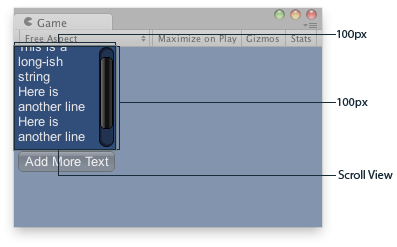 \ *游戏视图中的滚动视图。* ``` using UnityEngine; public class ExampleScript : MonoBehaviour { // The variable to control where the scrollview 'looks' into its child elements. Vector2 scrollPosition; // The string to display inside the scrollview. 2 buttons below add & clear this string. string longString = "This is a long-ish string"; void OnGUI() { // Begin a scroll view. All rects are calculated automatically - // it will use up any available screen space and make sure contents flow correctly. // This is kept small with the last two parameters to force scrollbars to appear. scrollPosition = GUILayout.BeginScrollView( scrollPosition, GUILayout.Width(100), GUILayout.Height(100)); // We just add a single label to go inside the scroll view. Note how the // scrollbars will work correctly with wordwrap. GUILayout.Label(longString); // Add a button to clear the string. This is inside the scroll area, so it // will be scrolled as well. Note how the button becomes narrower to make room // for the vertical scrollbar if (GUILayout.Button("Clear")) longString = ""; // End the scrollview we began above. GUILayout.EndScrollView(); // Now we add a button outside the scrollview - this will be shown below // the scrolling area. if (GUILayout.Button("Add More Text")) longString += "\nHere is another line"; } } ```
da
2022年6月10日 00:02
转发文档
收藏文档
上一篇
下一篇
手机扫码
复制链接
手机扫一扫转发分享
复制链接
关于 MrDoc
觅思文档MrDoc
是
州的先生
开发并开源的在线文档系统,其适合作为个人和小型团队的云笔记、文档和知识库管理工具。
如果觅思文档给你或你的团队带来了帮助,欢迎对作者进行一些打赏捐助,这将有力支持作者持续投入精力更新和维护觅思文档,感谢你的捐助!
>>>捐助鸣谢列表
微信
支付宝
QQ
PayPal
Markdown文件
分享
链接
类型
密码
更新密码